

Figma Config 2023: Introducing Latest and Exciting New Updates

Feelpixel-What is clean user interfaces in UX design-Blog

1) Dev Mode: A New Space for Developers

The Dev Mode in Figma is a new feature that makes it easier for developers to translate designs into code, faster, with tools that facilitate the workflow.

Dev Mode is a handy feature that functions like a browser inspector for your design file. It allows you to effortlessly obtain information such as measurements, specifications, and styles by hovering and clicking on objects. The best part is that it operates within a safe space, ensuring that your design file remains unaffected. Additionally, Dev Mode enables you to generate code snippets suitable for CSS, iOS, or Android, and you can even use plugins to customize the code for your preferred framework.

Watch more about Dev Mode:

2) Variables: Making Adaptable Designs

By using variables, designers can customize the designs for different brand themes, device formats, and more, making them highly versatile tools.

Variables offer a comprehensive solution to simplify the design process. They are flexible and can be used for various purposes, including creating dynamic prototypes. By utilizing variables, teams can test and evaluate a wide range of design ideas, gaining insights into how they perform in real-world scenarios. This enables teams to choose the most effective designs from a diverse set of options.

Watch more about Variables:

3) Advanced Prototyping: with Fewer Steps

Figma has introduced advanced prototyping features that create more realistic prototypes with fewer steps and connections. This means more iteration with less work for everyone.

Figma’s advanced prototyping features, including variables, conditions, and expressions, enhance the power and simplicity of prototyping. The addition of an inline preview allows for rapid iteration and instant playback of designs. These improvements reflect Figma’s dedication to enhancing the design process and promoting collaboration between design and product teams. Moreover, the recently introduced features showcased at the config conference make prototyping design systems significantly easier and more efficient.

Watch more about Advanced Prototyping:

4) Auto Layout Updates: More Responsive Components and Layouts

Figma’s improved auto layout now includes wrapping and min/max height/width settings. This simplifies manual resizing and frees up more time for creating responsive designs.

Auto layout in Figma has undergone significant improvements, providing designers with additional flexibility. The introduction of wrapping and the ability to define minimum and maximum height/width parameters simplifies the resizing process. By automating these tasks, designers can focus on crafting responsive components and layouts, resulting in a more efficient and productive design workflow.

Watch more about Auto Layout:

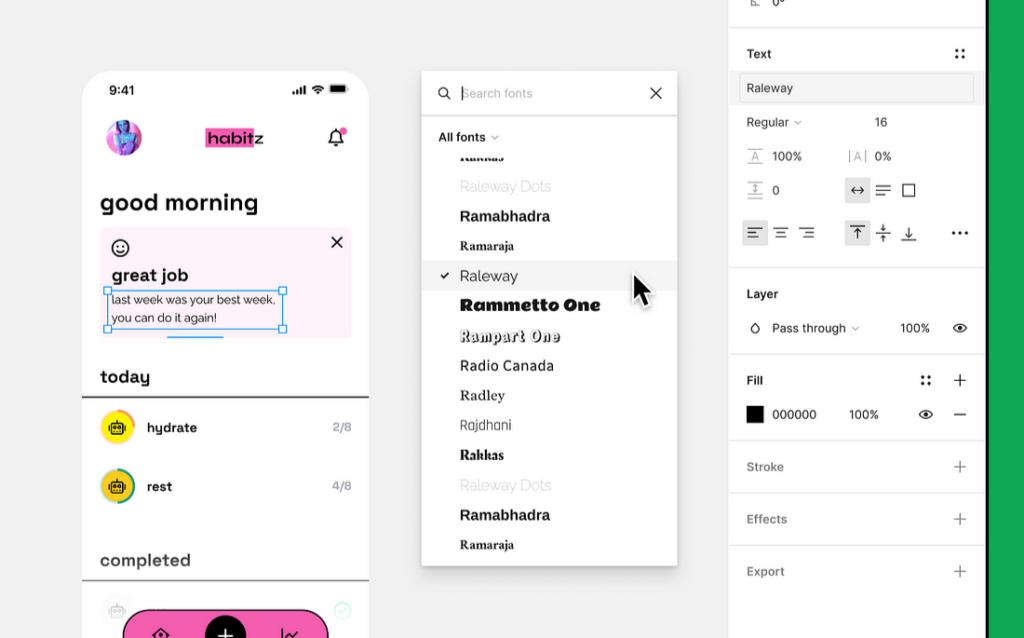
5) Font Picker: Preview Fonts Before You Use Them

Figma’s font picker now includes search, filter, and font name previews based on user feedback, improving the font selection experience.

The revamped font picker in Figma offers enhanced usability, allowing users to effortlessly search, filter, and preview font names in different styles. Additionally, users can also view their own installed fonts, providing a more user-centric design experience.

Figma Font
Source: Figma

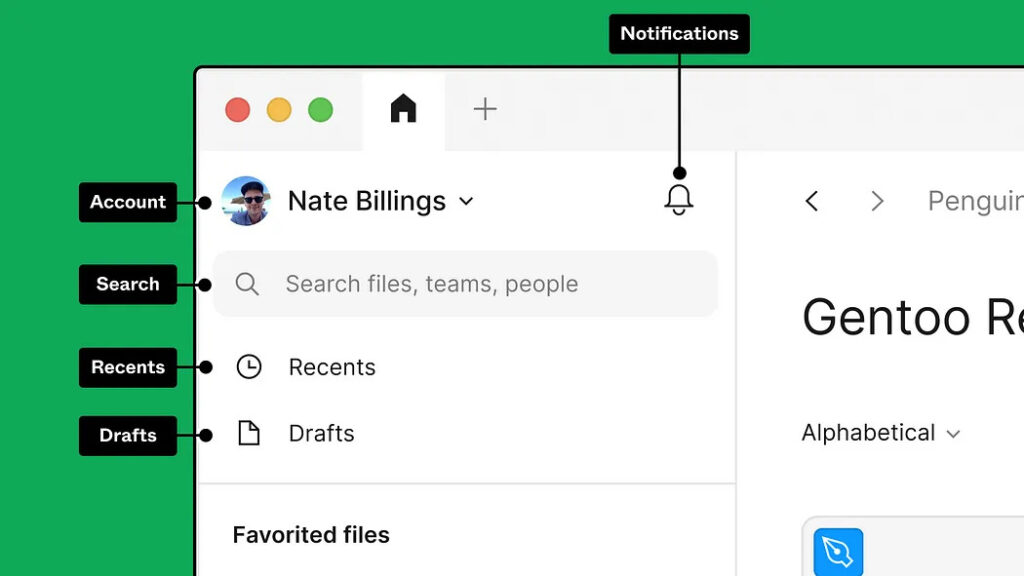
6) File Browser Glow-Up: Spend Less Time Searching, More Time Creating

Without navigating across spaces. Always find what you’re looking for — whether created by you, others, or within external teams.

Figma’s redesigned file browser simplifies finding files and projects shared by external teams. With unified search, recent items, and notifications, users can quickly locate what they need without switching spaces.

Figma File managner
Source: Figma

Thanks for reading the blog! We hope you find it valuable and easy to understand. To learn more about our projects, visit our projects page.

share

Related blogs

Feelpixel-khapara utsav-Maharashtrian cultre-Blog

Khapara Utsav: The Soul of Narur Village

Khapara Utsav is a deeply revered and culturally significant festival celebrated in Narur village, located in the Kudal taluka of Sindhudurg district, Maharashtra. The Khapara Utsav, celebrated every two years, is a testament to the villagers devotion. During the festival, various rituals and processions are held, and devotees from Narur and neighboring villages also from nearby states like Goa, Karnataka gather to seek the blessings of Shri Khapara Dev.
Feelpixel-CARS24 Orbit-Gold award winner-Blog

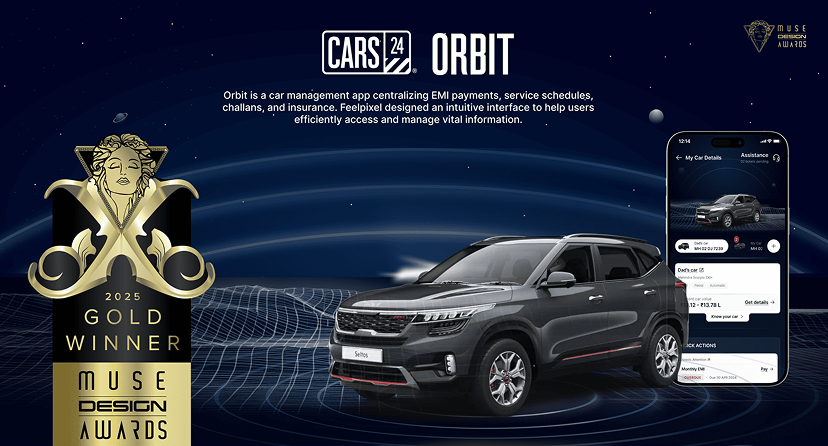
FEELPIXEL Wins Gold at the MUSE Design Award

We are thrilled to share that FEELPIXEL has been awarded Gold at the 2025 MUSE Design Awards for our work on ORBIT, a car management platform designed for CARS24. This recognition reinforces our belief that great design isn’t just about aesthetics; it’s about solving real problems with clarity, intelligence, and innovation.

Feelpixel-Future mobility experiences EV-UX, HMI-UX-Blog

Future Mobility Experiences: EV-UX, HMI-UX & AV-UX

The future of automotive isn’t speed, power or efficiency – It’s experience. Here’s an important question to design future automotive: How do cars feel, respond and interact with us? EVs are redefining fueling habits, Human-Machine Interfaces (HMIs) are turning car dashboards into digital assistants and Autonomous Vehicles (AVs) are inching towards reality.

Got a project in mind?